Discount Rules
Every rep gives the same discount on the same terms
Set your discount rules once. Flōware applies them on every rep's quotes and orders.
Nobody works out a discount by hand
The rules live in Flōware. Your rep enters the product and the quantity, and the discount follows.
- Bigger quantities get their discount
- Set a minimum quantity or line value. A line that reaches it gets the discount.
- One rule for a whole customer group
- Give your trade customers 5% with one rule. Change the rule once and new quotes follow.
- Promotions start and stop on their own
- Give a rule a start and end date. It applies only between them.
- Your rep can still type a discount
- A rep can switch the rules off on a line and type a discount instead.
Order 120 units and the volume discount is already there
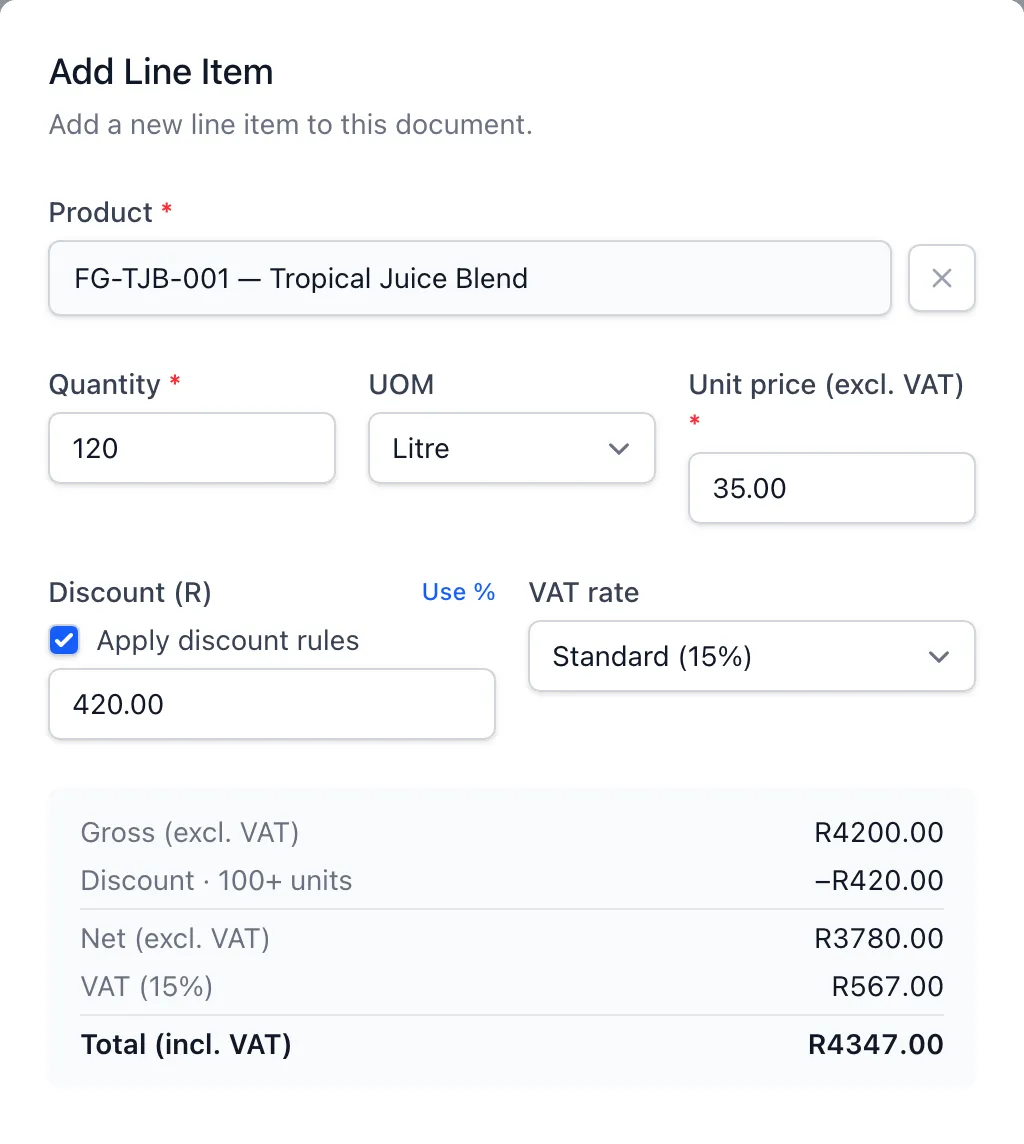
A rule gives 10% off from 100 units. Your rep enters 120 and Flōware takes off R420.00.
- The rule is named on the line
- The discount shows which rule gave it. Nobody wonders where the 10% came from.
- Totals before you save
- The discount, VAT and total update as soon as the quantity changes.
- Rules are on unless your rep turns them off
- Untick Apply discount rules to type a different discount. It's then marked as entered manually.
What your team stops doing
The rules are set once. Every rep's quotes use them.
- Asking a manager what discount to give
- Working out volume discounts by hand
- Two reps giving the same customer different discounts
- Remembering to end last month's promotion
For any business where more than one person quotes prices.
More in Sales Ops
Account OwnershipEvery customer has a named rep. Each rep can filter to their own customers, quotes and orders.Credit Holds with ApprovalsPut a customer on credit hold with two people's sign-off. Their orders stop until two people lift the hold.Customer ContactsEvery contact person for each customer and supplier, with the main one always at the top.
Get straight answers about your own business.
Why did margin drop? Where did the stock go? Which customers are slipping away? We show you where those answers would come from. We also tell you what Flōware would cost.