Sales Order Management
The full lifecycle of a sales order (from creation through approval, fulfillment, and delivery) with structured workflow, partial fulfillment, and complete traceability.
- One view of every order
Customer, addresses, line items, fulfillment progress, attachments, and full activity feed: all on a single page. No more chasing information across systems.
- Ship what's ready, hold the rest
Partial fulfillment by default: ship now, fulfill the balance later. Or flip the 'ship complete' flag for customers who need the whole order at once.
- No surprises at the warehouse
Stock availability is checked before you commit. Structured approval workflow means nothing leaves the warehouse without explicit sign-off.
- Complete audit trail
Every status change, every edit, every shipment is recorded automatically. Dispute resolution and compliance audits become a one-click lookup.
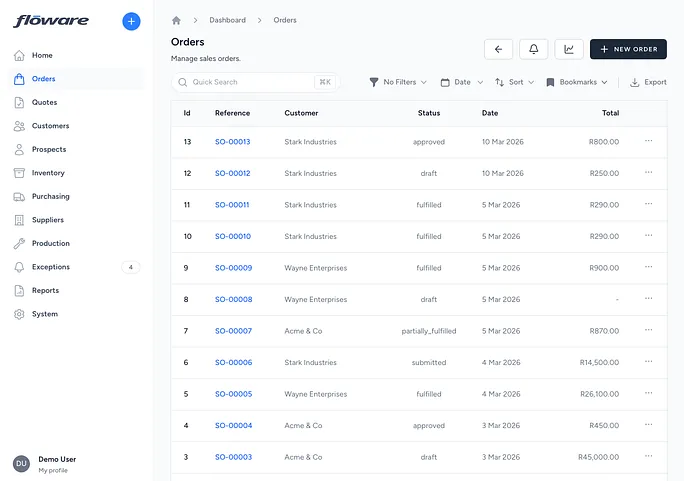
What it does
Manages the full lifecycle of a sales order: from creation through approval, fulfillment, and delivery. Each order tracks the customer, billing and shipping addresses, line items with products, quantities, prices, and discounts. Orders follow a structured workflow (Draft → Submitted → Approved → Processing → Fulfilled) with partial fulfillment support, so you can ship what's available now and fulfill the rest later.
What it replaces
Replaces tracking orders on paper, in spreadsheets, or in a basic system that doesn't connect orders to stock levels. Without this, confirming what's been ordered, what's been shipped, and what's still outstanding requires cross-referencing multiple documents and asking the warehouse directly.
Who it's for
Every business that takes orders from customers: distributors, wholesalers, manufacturers selling direct, and any company that needs to track what was ordered, what's been shipped, and what's still outstanding. This is a foundational feature that the rest of the sales workflow builds on.
What problems it solves
- No single view of an order's complete status. Each order has a detail page showing the customer, addresses, line items, fulfillment progress, attached documents, and a full activity feed: everything in one place.
- Orders can't be partially shipped. Vertex supports partial fulfillment by default: ship what's in stock now, and the order stays open until the remaining items are fulfilled. For customers who require complete shipments, the "ship complete" flag prevents partial fulfillment, and it holds even if stock moves while the shipment is being processed, so a ship-complete order can never go out short.
- Discounts and VAT have to be worked out by hand. Each line takes a discount as either an amount or a percentage (toggle between the two and the value stays exactly what you typed) plus its own VAT rate from a configured list. A live panel shows Gross − Discount = Net, then Net + VAT = Total as you type, so what the customer will pay is visible before you save the line.
- An order gets fulfilled when it shouldn't have been. Fulfillment is refused outright on an order that isn't in a state to be fulfilled (a draft, an unapproved order, or a cancelled one) instead of quietly deducting stock and leaving the status behind.
- No structured approval process before fulfillment. Orders move through Draft → Submitted → Approved before they can be fulfilled, so there's a clear checkpoint for review before goods leave the warehouse.
- Quotes don't connect to orders. Approved quotes can be converted directly into sales orders with one click, carrying across the customer, line items, and pricing. No re-keying.
- No record of what was shipped and when. Every fulfillment is recorded with its own reference, status, and line-by-line quantities. The Fulfillments tab shows the complete delivery history with PDF download and ship actions.
- Can't tell if stock is available before promising delivery. The order detail page shows stock availability warnings when a line item doesn't have enough inventory to fulfill, so you know before you commit.
- Stale orders never get closed off. Filter the list to orders that have gone cold, select them, and cancel the lot in one action. Any order too far along to be cancelled is refused by name with the reason, so the clear-out never quietly skips something you assumed was handled.