Lot and Batch Tracking
Know where every batch is and when it expires
Each batch keeps its lot number, its expiry date and your supplier's batch number. When a supplier recalls a batch, you can see where it is and hold it at once.
The batch goes wherever the stock goes
The batch goes with the stock when it's received, moved, counted or adjusted.
- Oldest stock goes out first
- Flōware picks the batch that expires first, or the one that arrived first. You choose which.
- See which batches are about to expire
- Batches close to their expiry date show in amber. Expired ones show in red.
- Find a batch by its number
- Type the lot number or scan its barcode to open the batch.
- Hold a batch in one step
- When a supplier flags a problem, put that batch on hold at once.
Your team finds a recalled batch and holds it
This is one batch of mango concentrate. Its page shows its expiry, your supplier's batch number and where every unit sits.
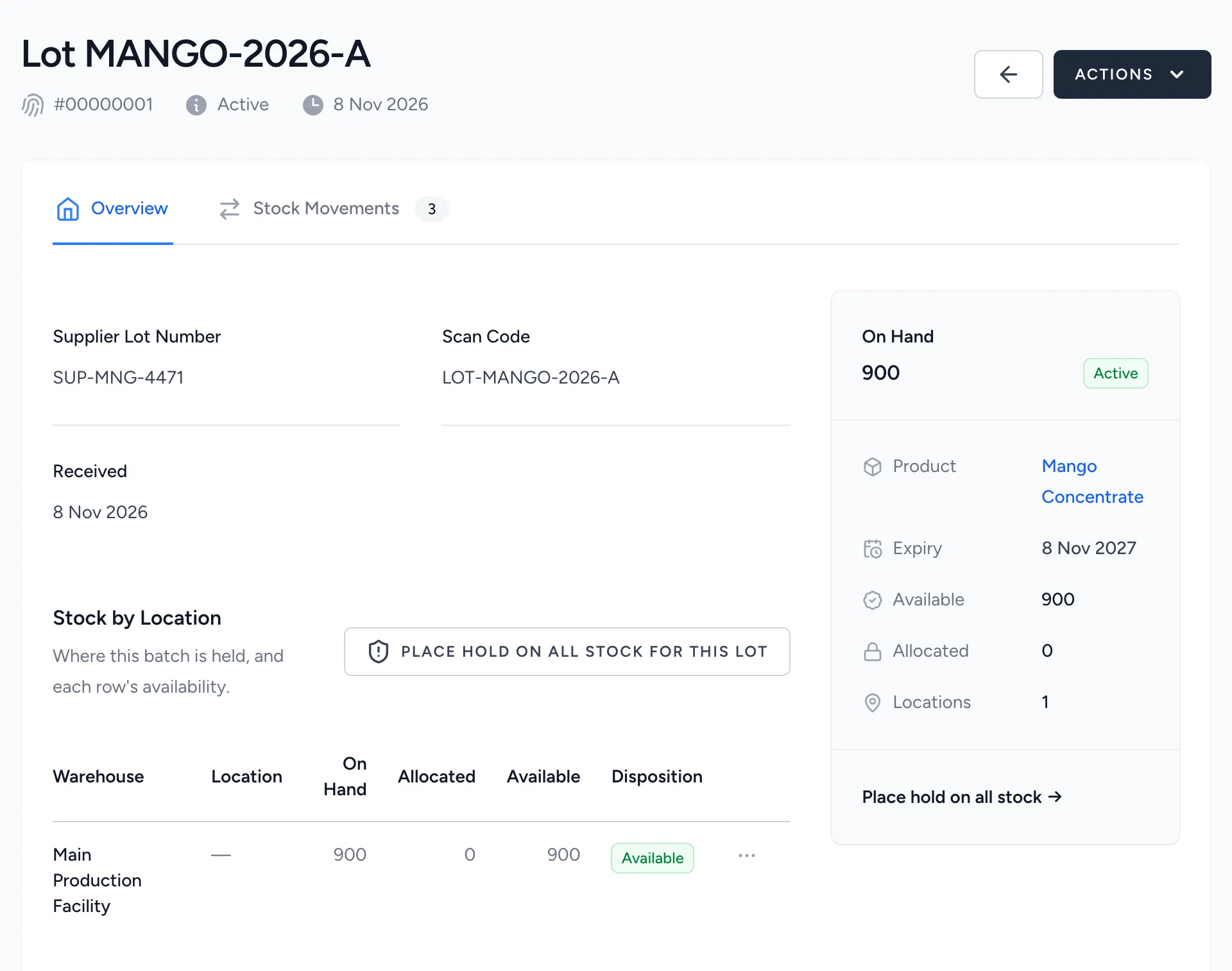
- Your supplier's batch number
- The supplier's lot number sits next to yours. You can match their recall notice to your stock.
- Where every unit sits
- Each warehouse and location holding the batch is listed, with how much is there.
- Hold the batch in one step
- One button puts the batch on hold, wherever it is.
What your team stops doing
Batch numbers and expiry dates are kept in Flōware from the moment stock is received.
- Writing batch numbers in a logbook
- Finding expired stock at the back of a shelf
For businesses that hold stock where the batch matters, such as food, chemicals and cosmetics.
More in Inventory
Barcode and ScanningScan every pick, receipt and count. A beep confirms the right item. A warning tone flags the wrong one.Label PrintingPrint a barcode label for a product, a batch or a whole delivery. Supplier barcodes scan as they are.Product ImagesEvery product gets its own photos, in the order you choose, with a full-size view.
Get straight answers about your own business.
Why did margin drop? Where did the stock go? Which customers are slipping away? We show you where those answers would come from. We also tell you what Flōware would cost.