Make-to-Order Workflow
Connects the customer order to the factory floor and back. Turn any sales-order line into a linked production run in one click (or batch the whole order), watch live "where's my order?" status without leaving the sales order, pull unmet demand from a production worklist, and get told automatically when a run won't meet its promised delivery date.
- One click from order to production
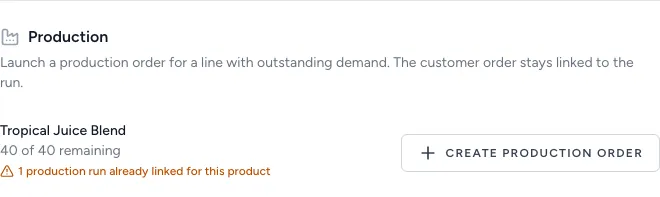
Each make-to-order line carries a "Create production order" button that opens a pre-filled, source-linked run (product, bill of materials, and remaining quantity already set). Batch a whole multi-line order into one set of runs from a single action.
- "Where's my order?" answered in place
A Production tab on the sales order shows every linked run, its status, progress, and an overdue / on-time badge, so a CSR answers the customer without hopping between screens.
- A live list of what still needs making
A "To Produce" worklist pulls unmet, manufacturable demand straight from open sales orders. No one has to raise a production request, and the queue can never drift from reality.
- At-risk deliveries flag themselves
When an open run won't meet its customer's promised date, the system raises an exception automatically (warning as the date approaches, critical once it passes) so the team is told before the customer calls.
What it does
Links the sales order to the factory floor and back for make-to-order work. From any eligible sales-order line a planner creates a production run in one click: the run is pre-filled with the line's product, active bill of materials, and remaining quantity, and is permanently linked to the originating order. A header action batches a whole order's lines into a set of runs at once. From the sales side, a Production tab on the order lists every linked run with status and progress, plus a promised-date badge. From the production side, a "To Produce" worklist surfaces unmet manufacturable demand across all open orders, prioritised by delivery commitment. And a scheduled exception rule flags any open run that is unlikely to meet its customer's promised date.
What it replaces
Replaces the manual handoff between sales and production: re-keying a production order from a customer order by hand, then losing the connection between the two. It replaces the screen-hopping a customer-service rep does to answer "where's my order?" (leave the order, search production, cross-reference two screens), the verbal or spreadsheet "what do we need to make this week?" list, and finding out a delivery will be late only when the customer calls to chase it.
Who it's for
Manufacturers who build against specific customer orders rather than (or as well as) to stock: make-to-order and assemble-to-order shops in food & beverage, chemicals, cosmetics, building materials, industrial and light assembly. Most valuable where customers are given a promised delivery date and the business is judged on hitting it, and where the same people field "where's my order?" calls while production runs against a queue. Mixed make-to-order / make-to-stock operations benefit too: the make-to-stock side is untouched, and only orders with real customer-linked demand grow the extra surfaces.
What problems it solves
- The sales-to-production handoff is manual and lossy. A make-to-order line becomes a production run in one click (product, bill of materials, and remaining quantity pre-filled) and the run stays permanently linked to the order it was raised for. A whole order's lines can be turned into runs in a single batch action.
- "Where's my order?" means hopping between screens. A Production tab on the sales order lists every linked run with its status, planned-vs-produced progress, and a summary like "2 of 3 complete, 1 in progress": the answer lives on the screen the rep already has open.
- No clear, trustworthy list of what to make. A "To Produce" worklist is derived live from open customer demand minus the production already linked to it, so it can never drift from reality: there's no separate request to keep in sync. Each row launches straight into a pre-filled run.
- Late deliveries are discovered too late. A scheduled rule compares each open run's progress against its customer's promised date and raises an exception automatically (a warning as the date approaches and a critical once it has passed) so the business is told, not left to find out.
- Commitments aren't visible where decisions get made. The promised date and an overdue / on-time badge show on the sales order and the worklist sorts soonest-due first, so the most urgent work floats to the top without anyone sorting a spreadsheet.