Purchase Order Management
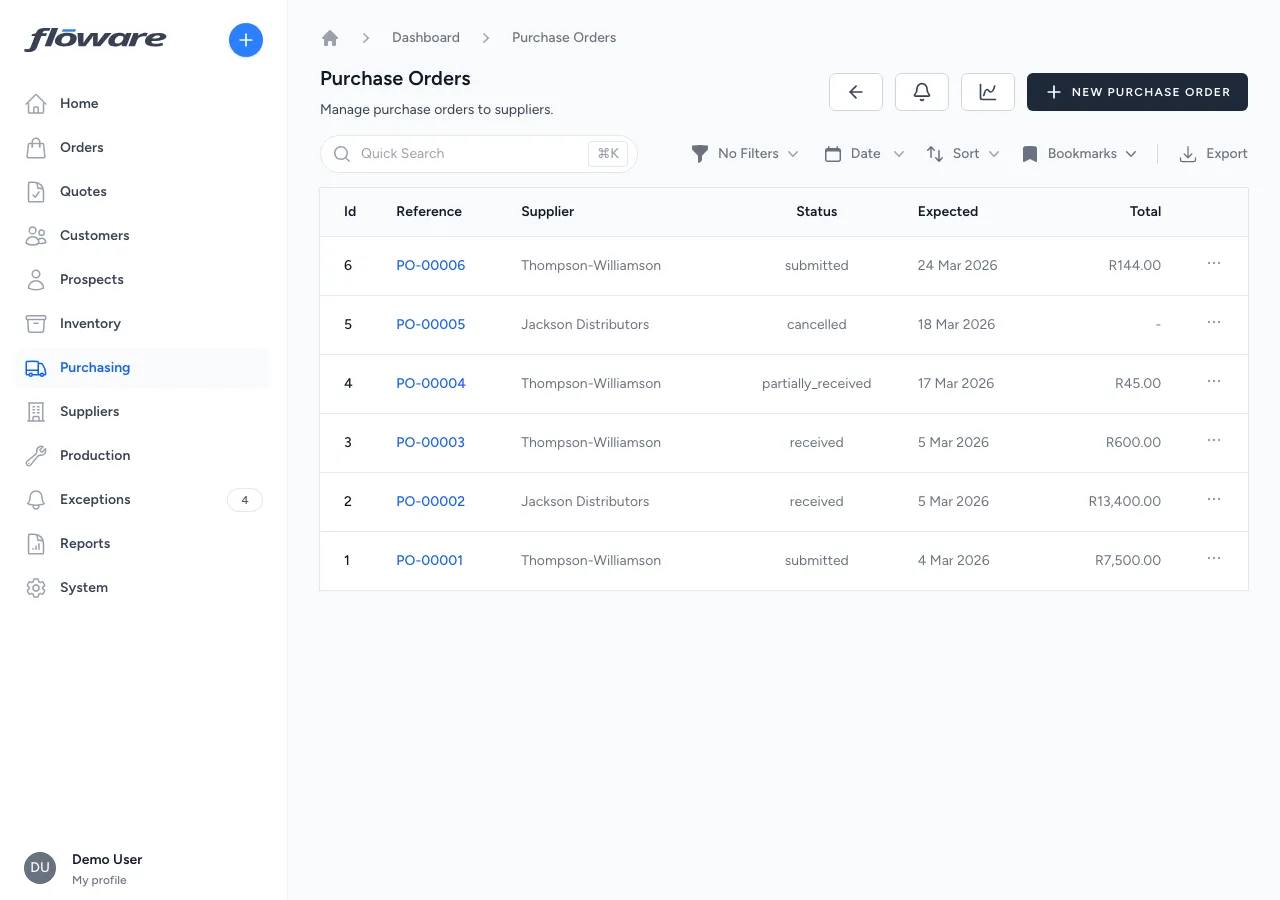
The full purchasing cycle (draft, submit, receive, close) with partial receiving supported by default and stock levels updating automatically on every delivery.
- A clear view of what's outstanding
Each PO shows supplier, line items with ordered vs received, expected delivery, and total value, with a status badge that tells the story at a glance.
- Receiving updates stock automatically
Book in goods and inventory reflects them immediately, no separate stock adjustment needed. Full receipt history on every PO.
- Partial deliveries supported by default
Book in what arrives, leave the PO open, track each delivery separately. No workarounds for suppliers who can't ship it all at once.
- PDF PO straight to the supplier
Download or email the PO as a professional PDF (your branding, supplier address, line items, expected delivery). One click from the record.
What it does
Manages the full purchasing cycle, from creating a purchase order for a supplier, through submitting it, receiving goods against it, and closing it out. Each PO tracks the supplier, destination warehouse, expected delivery date, line items with products, quantities, and prices. POs progress through a structured workflow (Draft → Submitted → Partially Received → Received) and support partial receiving, so goods can be booked in as they arrive without waiting for the full delivery. Stock levels update automatically when goods are received.
What it replaces
Replaces emailing suppliers with order details in the body of an email, tracking deliveries in a spreadsheet, and manually updating stock when goods arrive. Without this, knowing what's been ordered, what's arrived, and what's still outstanding means cross-referencing emails, delivery notes, and inventory counts by hand.
Who it's for
Any business that purchases goods from suppliers: distributors restocking from manufacturers, manufacturers ordering raw materials, wholesalers replenishing inventory. Particularly valuable for businesses managing multiple suppliers, frequent deliveries, and large product catalogues where manual tracking quickly breaks down.
What problems it solves
- No single view of what's been ordered and what's outstanding. Each PO shows the supplier, line items with ordered and received quantities, expected delivery date, and total value, all in one place with a clear status badge (submitted, partially received, received).
- Receiving goods doesn't update stock levels. When goods are received against a PO, inventory is updated automatically, no separate stock adjustment needed. The Goods Receipts tab shows a full history of every delivery with timestamps and quantities.
- Partial deliveries are hard to track. The system supports partial receiving by default: book in what arrives and the PO stays open until everything is received. Each receipt is recorded separately so you can see exactly what came in each delivery.
- No formal record to send to the supplier. POs can be downloaded as a PDF or emailed directly to the supplier, providing a professional document with your company details, supplier address, line items, and expected delivery date.
- Orders that will never be fully delivered stay open forever. Short close lets you intentionally close a partially received PO with a reason, keeping your open PO list clean and accurate. (See also: Goods Receipt Management.)