Roles and Permissions
Role-based access control across 16 business areas: screens hidden when access isn't granted, actions blocked when not authorised. Least privilege by default.
- Least-privilege by default
Sales manages quotes, orders, customers (not inventory or pricing). Warehouse manages stock and POs (not pricing). Each role gets only what it needs.
- New users, instantly configured
Assign a role when inviting a user and they get the right access immediately. No configuring individual permissions one by one.
- Permissions grid on every user
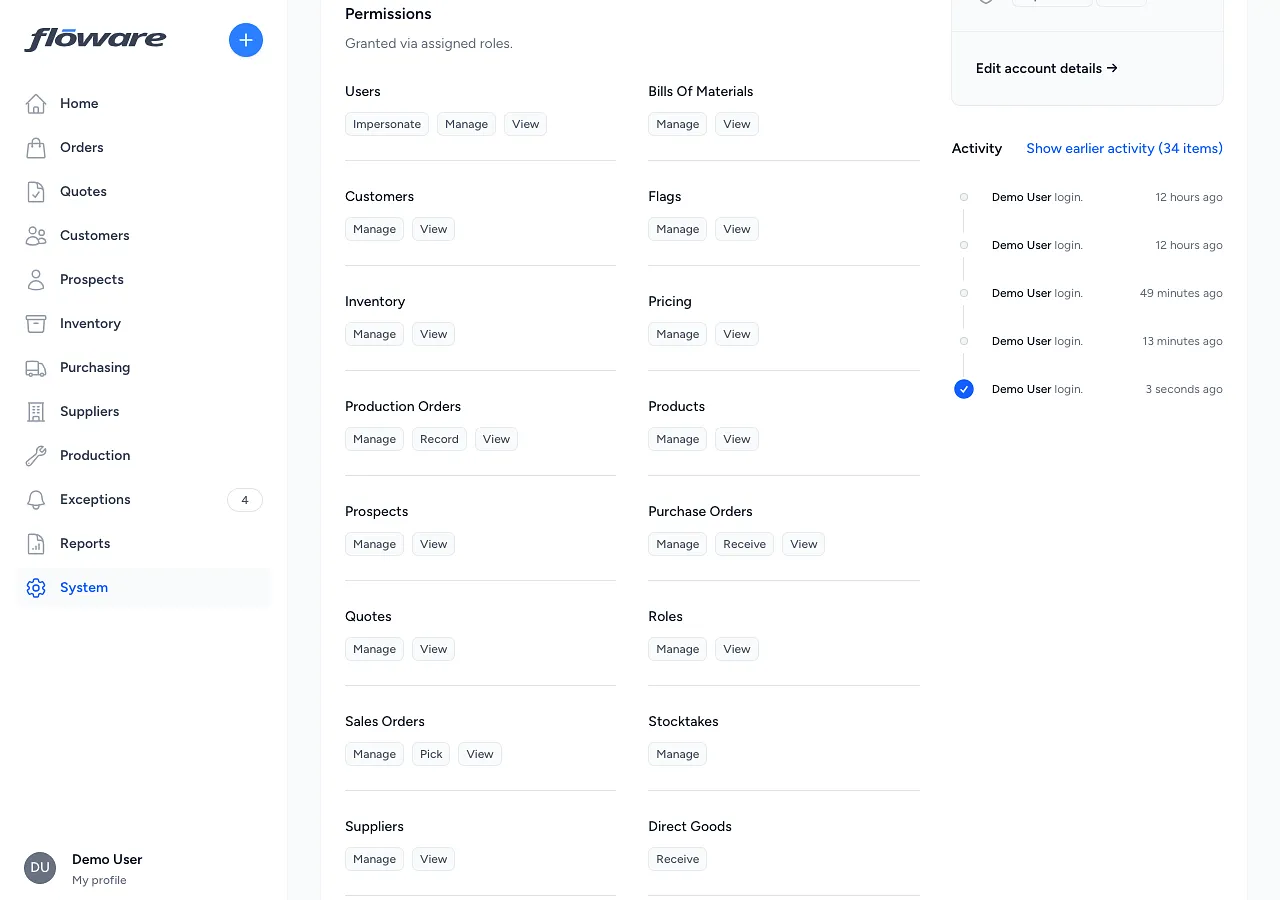
Each user's detail page shows a clear grid of business areas and access levels (view, manage, pick) so it's obvious what they can and can't do.
- View vs change vs pick
Permissions split three ways (read-only visibility, full management, and warehouse-specific pick rights) so you can show someone an area without giving them control.
What it does
Controls what each user can see and do within the system using role-based access control. Every user is assigned one or more roles, and each role grants a specific set of permissions across 16 business areas, from customers and orders to inventory, pricing, and production. Permissions are enforced everywhere: screens that a user doesn't have access to are hidden from their navigation, and actions they're not authorised to perform are blocked.
What it replaces
Replaces the all-or-nothing approach where everyone shares the same login, or where access restrictions require IT involvement every time someone joins or changes role. Without granular permissions, businesses either give everyone full access (risky) or restrict access so heavily that people can't do their jobs (frustrating).
Who it's for
Any business with more than a handful of users, especially those where different teams handle different functions. A distributor with separate sales, warehouse, and admin teams needs each group to see only what's relevant to them. A manufacturer needs production staff to access BOMs and production orders without being able to modify pricing or customer data. The more people using the system, the more important clear access boundaries become.
What problems it solves
- Everyone can change everything. Each role grants only the permissions that role needs. A sales user can manage quotes, orders, and customers but cannot adjust stock or change pricing rules. A warehouse user can manage inventory and purchase orders but cannot modify customer records.
- Setting up access for a new person takes too long. Assign a role when inviting a user and they immediately get the right access. No need to configure individual permissions one by one.
- Hard to see what access someone actually has. Every user's detail page shows a clear permissions grid, listing every business area with their access level (view, manage, pick) at a glance.
- No separation between "can see" and "can change". Permissions are split into view (read-only), manage (create, edit, delete), and pick (warehouse operations), so you can give someone visibility into an area without letting them make changes.