Workflow Engine
Structured approval chains, onboarding checklists, and quality review workflows attached to any document. Ten workflows out of the box and custom workflows supported, every step audited.
- Approvals that can't be bypassed
Workflows block documents from advancing until required steps complete. A PO stuck in 'submitted' literally cannot become 'approved' without Finance sign-off.
- Onboarding checklists, triggered automatically
Create a new customer or supplier and a multi-step checklist kicks off: each step assigned to a role, overdue steps generate reminders.
- Delegations for leave cover
Set up a temporary proxy so another person can action your workflow steps. The original approver can still act too, so nothing gets locked out.
- Every approval, audited
Every sign-off, rejection, reassignment, and skip is logged with user, timestamp, and notes: the full timeline visible on the workflow detail page and in the system audit log.
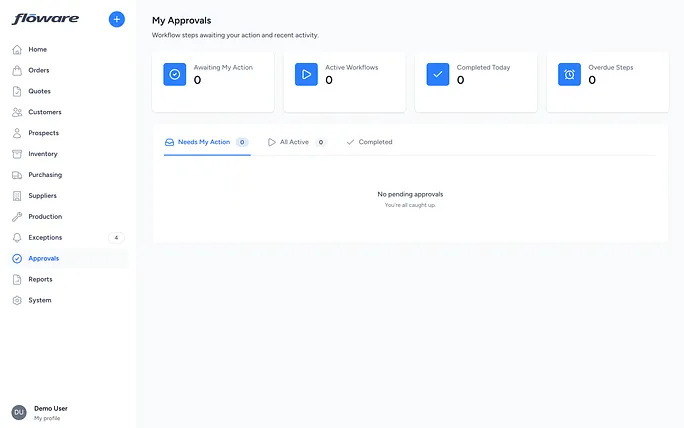
What it does
The Workflow Engine adds structured approval chains, onboarding checklists, and quality review processes to documents across the system. When a purchase order exceeds R50,000, the system automatically requires Finance and Director sign-off before it can move forward. When a new customer is created, a six-step onboarding checklist is kicked off. When goods arrive, a parallel quality inspection review is triggered. Ten workflows ship out of the box covering the most common approval and compliance needs, and Floware can add custom workflows for anything specific to your business.
What it replaces
Without a workflow engine, approvals happen over email ("Can you approve this PO?"), checklists live in spreadsheets that nobody updates, and quality inspections are tracked on paper forms. The result is lost approvals, skipped steps, and no audit trail of who approved what and when. This feature moves all of that into the system where it's tracked, enforced, and auditable.
Who it's for
- Any business with spending controls. If purchase orders, credit notes, or invoices above a certain value need a second pair of eyes, the approval workflow enforces it automatically.
- Businesses with compliance or onboarding requirements. If a new customer or supplier needs credit checks, compliance sign-off, document collection, and account setup before they're ready to trade, the checklist workflow tracks every step.
- Manufacturers and distributors with quality requirements. If incoming goods need visual inspection, documentation checks, or lab testing before they're released into stock, the review workflow captures pass/fail outcomes for each check.
- Companies with segregation-of-duties requirements. The engine prevents the person who raised a document from approving it themselves, a common audit requirement.
What problems it solves
- "Who approved that purchase order?" Every approval, rejection, reassignment, and skip is logged with the user, timestamp, and any notes. The full timeline is visible on the workflow detail page and in the system-wide audit log.
- "The PO went through without Finance sign-off." Approval workflows block the document from advancing until every required step is completed. A purchase order stuck in "submitted" literally cannot be moved to "approved" until the workflow completes: no workarounds, no exceptions (unless an administrator explicitly skips the step, which is also logged).
- "We forgot to do the credit check on that new customer." Onboarding checklists are triggered automatically when a customer or supplier is created. Each step is assigned to a specific role, and overdue steps generate reminder emails.
- "I'm on leave. Who handles my approvals?" Users can set up a delegation: a temporary proxy where another person can action their workflow steps for a defined date range. The original approver can still act too, so nothing is locked out.
- "Can the person who raised the PO also approve it?" Segregation of duties is enforced where configured: the engine prevents self-approval automatically.
- "Our quality inspection results are on paper somewhere." Review workflows capture pass, fail, or noted outcomes against a structured checklist of inspection points, all linked to the goods receipt record.